Jim
  • Getting Started Guides
    Professional using a laptop and smartphone to study for a certification exam with Gimkit's gamified interface visible, emphasizing active recall and saving money.

    Professional Certification Prep with Gimkit: Pass Faster, Save Money & Actually Retain What You Learn

    A vibrant, photo-realistic image depicting a modern art classroom where students are engaged with tablets, seamlessly integrated with traditional art supplies like paintbrushes, canvases, and clay. The scene subtly blends digital and physical art learning.

    Art Class Gimkit Games: 60+ Creative Assessment Ideas for Visual Arts Teachers 

    Warm, realistic image of a smiling preschool teacher guiding young diverse students with a colorful, visual Gimkit game projected on an interactive whiteboard, emphasizing adapted early childhood learning

    Gimkit for Preschool & Kindergarten: Adaptation Guide

    A cozy home setting with a parent guiding their child through Gimkit on a laptop, emphasizing fun and interactive learning

    A Parent’s Guide to Helping Kids Use Gimkit from Home

    High-quality, realistic image of a middle school classroom during a Gimkit game. Focus on a student's hands on a tablet, showing a dynamic, colorful in-game screen with a virtual cash counter and upgrade buttons clearly visible. In the background, the teacher's dashboard is subtly projected onto a whiteboard, showing live analytics. Modern, bright lighting and a slightly blurred background to emphasize the student's engagement and strategic focus.

    The Main Features of Gimkit: A Teacher’s Deep Dive into Interactive Learning

    How to Change UserName After Joining Gimkit

    How to Change Your Username on Gimkit After Joining a Game

    How to Sign Up for Gimkit: Create Your Free Account (Beginner’s Guide)

    Gimkit login

    Gimkit Login and How Do Its Features Help Students & Teachers Alike?

    Gimkit dashboard

    The Gimkit Dashboard Guide: Mastering Kit Creation, Reports, and Live Games for Educators

  • Teacher Guides & Learning
    Photo-realistic image of a middle school classroom where a smiling teacher is setting up a Gimkit game on an interactive smartboard, while students actively participate on tablets and smartphones, demonstrating high engagement with the educational game platform.

    How to Create a Gimkit Game: Complete Step-by-Step Guide for Teachers

    A strategic farm layout inspired by Gimkit Farmchain showing crops, research upgrades, and energy management elements representing early-, mid-, and end-game strategy.

    How to Change the Background in Gimkit Creative: Terrain, Barrier Tricks & Design Tips

    A vibrant, photo-realistic image depicting a diverse group of elementary and middle school students in a modern classroom, actively engaged with tablets or laptops. They are smiling and interacting, with a large interactive whiteboard in the background displaying a colorful, game-like interface that hints at Gimkit. The scene emphasizes fun, quick learning, and technology integration.

    Microlearning with Gimkit: 5-Minute Daily Reviews

    A vibrant, photo-realistic image depicting a digital tablet showing a lively Gimkit game interface on one side, seamlessly connecting via data lines to a laptop displaying a PowerSchool gradebook with synchronized scores on the other. This visual represents efficient grade syncing and technology integration for teachers, saving time on classroom assessment.

    Gimkit and PowerSchool Integration: A Simple Grade Sync Tutorial for Teachers

    Photo-realistic conceptual image showing a grade score (e.g., 95%) being automatically transferred from a colorful, gamified interface (Gimkit) to a structured, dark-mode gradebook view (Blackboard Learn) via a glowing, digital connection, symbolizing seamless LTI integration and teacher workflow automation.

    Gimkit + Blackboard Learn: Seamless Grade Integration – Stop Manually Typing Scores!

    Photo-realistic image of diverse high school students cheering and laughing while playing a mix of digital and low-prep end-of-year review games in a vibrant classroom. The scene features a student aiming a crumpled paper at a trash can (Trash-ketball) near a laptop showing a competitive digital quiz game like Gimkit.

    End-of-Year Review Games That Students Actually Want to Play

    A vibrant split image showing a classroom of diverse, smiling students actively playing holiday-themed Gimkit games on tablets. The top half of the image transitions from a warm autumn scene with falling leaves and pumpkins to a snowy winter landscape with decorated trees, framing the text "Holiday-Themed Games for Every Season" and the Gimkit logo. The classroom features a teacher interacting with students, a large screen displaying "Gimkit Holiday-Themed Games," and festive string lights, emphasizing fun and learning before school breaks.

    The Gimkit Playbook: Holiday-Themed Games for Every Season

    A vibrant, organized desk with an open economics textbook, a laptop displaying a revision website, a notebook with diagrams, and highlighters, symbolizing comprehensive A-Level Economics study resources.

    Nailing Your A-Level: The Ultimate Economics Resource Guide

    Photo-realistic image of a teacher's hands securely organizing digital data on a tablet next to a physical school file, representing Gimkit student data export and deletion for compliance.

    How to Export and Delete Student Data from Gimkit (2025 Compliance Guide)

  • Fixes & Technical Help
    A classroom with students using tablets for offline games, connected via mobile hotspots, highlighting the adaptability of low-bandwidth learning environments.

    Using Gimkit Offline: Solutions for Low-Bandwidth Classrooms

    Teacher configuring school computer firewall settings and network configurations in a modern classroom to access educational tools like Gimkit

    How to Access Gimkit on Restricted School Devices: A Guide for IT & Educators

    A frustrated teacher sitting at a desk in a modern classroom, looking at a slow-loading Gimkit game on a laptop screen. The digital board displays 'Gimkit Loading...' with a progress bar, while students in the background wait for the game to start. The classroom is tech-friendly, with laptops and tablets on desks

    Step-by-Step Guide to Fixing Gimkit Lag Issues

    A frustrated teacher in a modern classroom looking at a laptop screen with a Gimkit loading error. Students in the background waiting for the game to start

    Gimkit Not Loading? Common Solutions for Technical Issues

    How to Play Gimkit yourself

    How to Play Gimkit yourself? Getting Started & Troubleshooting Bugs to Know

  • Contact us
  • About Us
No Result
View All Result
Gim
  • Getting Started Guides
    Professional using a laptop and smartphone to study for a certification exam with Gimkit's gamified interface visible, emphasizing active recall and saving money.

    Professional Certification Prep with Gimkit: Pass Faster, Save Money & Actually Retain What You Learn

    A vibrant, photo-realistic image depicting a modern art classroom where students are engaged with tablets, seamlessly integrated with traditional art supplies like paintbrushes, canvases, and clay. The scene subtly blends digital and physical art learning.

    Art Class Gimkit Games: 60+ Creative Assessment Ideas for Visual Arts Teachers 

    Warm, realistic image of a smiling preschool teacher guiding young diverse students with a colorful, visual Gimkit game projected on an interactive whiteboard, emphasizing adapted early childhood learning

    Gimkit for Preschool & Kindergarten: Adaptation Guide

    A cozy home setting with a parent guiding their child through Gimkit on a laptop, emphasizing fun and interactive learning

    A Parent’s Guide to Helping Kids Use Gimkit from Home

    High-quality, realistic image of a middle school classroom during a Gimkit game. Focus on a student's hands on a tablet, showing a dynamic, colorful in-game screen with a virtual cash counter and upgrade buttons clearly visible. In the background, the teacher's dashboard is subtly projected onto a whiteboard, showing live analytics. Modern, bright lighting and a slightly blurred background to emphasize the student's engagement and strategic focus.

    The Main Features of Gimkit: A Teacher’s Deep Dive into Interactive Learning

    How to Change UserName After Joining Gimkit

    How to Change Your Username on Gimkit After Joining a Game

    How to Sign Up for Gimkit: Create Your Free Account (Beginner’s Guide)

    Gimkit login

    Gimkit Login and How Do Its Features Help Students & Teachers Alike?

    Gimkit dashboard

    The Gimkit Dashboard Guide: Mastering Kit Creation, Reports, and Live Games for Educators

  • Teacher Guides & Learning
    Photo-realistic image of a middle school classroom where a smiling teacher is setting up a Gimkit game on an interactive smartboard, while students actively participate on tablets and smartphones, demonstrating high engagement with the educational game platform.

    How to Create a Gimkit Game: Complete Step-by-Step Guide for Teachers

    A strategic farm layout inspired by Gimkit Farmchain showing crops, research upgrades, and energy management elements representing early-, mid-, and end-game strategy.

    How to Change the Background in Gimkit Creative: Terrain, Barrier Tricks & Design Tips

    A vibrant, photo-realistic image depicting a diverse group of elementary and middle school students in a modern classroom, actively engaged with tablets or laptops. They are smiling and interacting, with a large interactive whiteboard in the background displaying a colorful, game-like interface that hints at Gimkit. The scene emphasizes fun, quick learning, and technology integration.

    Microlearning with Gimkit: 5-Minute Daily Reviews

    A vibrant, photo-realistic image depicting a digital tablet showing a lively Gimkit game interface on one side, seamlessly connecting via data lines to a laptop displaying a PowerSchool gradebook with synchronized scores on the other. This visual represents efficient grade syncing and technology integration for teachers, saving time on classroom assessment.

    Gimkit and PowerSchool Integration: A Simple Grade Sync Tutorial for Teachers

    Photo-realistic conceptual image showing a grade score (e.g., 95%) being automatically transferred from a colorful, gamified interface (Gimkit) to a structured, dark-mode gradebook view (Blackboard Learn) via a glowing, digital connection, symbolizing seamless LTI integration and teacher workflow automation.

    Gimkit + Blackboard Learn: Seamless Grade Integration – Stop Manually Typing Scores!

    Photo-realistic image of diverse high school students cheering and laughing while playing a mix of digital and low-prep end-of-year review games in a vibrant classroom. The scene features a student aiming a crumpled paper at a trash can (Trash-ketball) near a laptop showing a competitive digital quiz game like Gimkit.

    End-of-Year Review Games That Students Actually Want to Play

    A vibrant split image showing a classroom of diverse, smiling students actively playing holiday-themed Gimkit games on tablets. The top half of the image transitions from a warm autumn scene with falling leaves and pumpkins to a snowy winter landscape with decorated trees, framing the text "Holiday-Themed Games for Every Season" and the Gimkit logo. The classroom features a teacher interacting with students, a large screen displaying "Gimkit Holiday-Themed Games," and festive string lights, emphasizing fun and learning before school breaks.

    The Gimkit Playbook: Holiday-Themed Games for Every Season

    A vibrant, organized desk with an open economics textbook, a laptop displaying a revision website, a notebook with diagrams, and highlighters, symbolizing comprehensive A-Level Economics study resources.

    Nailing Your A-Level: The Ultimate Economics Resource Guide

    Photo-realistic image of a teacher's hands securely organizing digital data on a tablet next to a physical school file, representing Gimkit student data export and deletion for compliance.

    How to Export and Delete Student Data from Gimkit (2025 Compliance Guide)

  • Fixes & Technical Help
    A classroom with students using tablets for offline games, connected via mobile hotspots, highlighting the adaptability of low-bandwidth learning environments.

    Using Gimkit Offline: Solutions for Low-Bandwidth Classrooms

    Teacher configuring school computer firewall settings and network configurations in a modern classroom to access educational tools like Gimkit

    How to Access Gimkit on Restricted School Devices: A Guide for IT & Educators

    A frustrated teacher sitting at a desk in a modern classroom, looking at a slow-loading Gimkit game on a laptop screen. The digital board displays 'Gimkit Loading...' with a progress bar, while students in the background wait for the game to start. The classroom is tech-friendly, with laptops and tablets on desks

    Step-by-Step Guide to Fixing Gimkit Lag Issues

    A frustrated teacher in a modern classroom looking at a laptop screen with a Gimkit loading error. Students in the background waiting for the game to start

    Gimkit Not Loading? Common Solutions for Technical Issues

    How to Play Gimkit yourself

    How to Play Gimkit yourself? Getting Started & Troubleshooting Bugs to Know

  • Contact us
  • About Us
No Result
View All Result
Gim
No Result
View All Result
Home Teacher Guides & Learning

Can Gimkit Build Critical Thinking, Problem-Solving, and Analytical Skills?

Amelia Bree by Amelia Bree
August 18, 2025
in Teacher Guides & Learning
0
A diverse group of students collaborates on tablets in a classroom, with game-like puzzles on screen that represent critical thinking and problem-solving. This image visually captures the concept of using Gimkit for building specific skills in a modern educational setting.
Share on FacebookShare on Twitter

Can a Game Actually Teach Critical Thinking? (Spoiler: Yes, But Not How You’d Expect)

I’ll be honest—when I first started using Gimkit in October 2022, I just wanted my 7th graders to memorize vocabulary without complaining. Review games = less grading = happy teacher. If you’re new and want to see how to start, check out the main features of Gimkit.

Then something weird happened during a “Trust No One” session in March 2023.

My student Marcus (who usually guessed randomly) suddenly stopped. He stared at his screen for 30 seconds—an eternity in middle school time. When I asked what he was doing, he said: “I’m analyzing voting patterns to figure out who the impostor is.”

Wait. Analyzing? Evaluating evidence? Making strategic decisions based on data?

That’s when it hit me: Gimkit wasn’t just making review “fun.” It was accidentally building the exact skills we spend hours teaching explicitly—critical thinking, problem-solving, and analytical reasoning. Research on the benefits of educational gamification strongly supports this idea.

Over the past three years and 500+ Gimkit sessions, I’ve figured out how to make this “accident” happen on purpose. This guide is based on my real classroom data and experience, showing you how to turn any Gimkit game into a critical thinking powerhouse.

At a Glance: Gimkit for Skill-Building

This quick reference table breaks down my highest-impact strategies for Gimkit for building specific skills.

Skill Focus Best Gimkit Mode Question Type Why It Works
Critical Thinking Classic, Trust No One Scenario-based, Justification Requires evidence and analysis.
Problem-Solving One Way Out, Trust No One Multi-step Dilemma Forces resource allocation and planning.
Decision-Making Team Mode, Trust No One Compare/Contrast, Evaluate Promotes consensus and weighing consequences.
Analytical Skills Text Input, Classic Data Inference, “Why” and “How” Demands explanation, not just recall.

Why Most Gimkit Questions Stay at “Remember” Level (And How to Fix It)

Here’s the uncomfortable truth: When I analyzed my first 50 Gimkit questions in 2023, 47 of them were basic recall. “What is photosynthesis?” “Name the capital of France.”

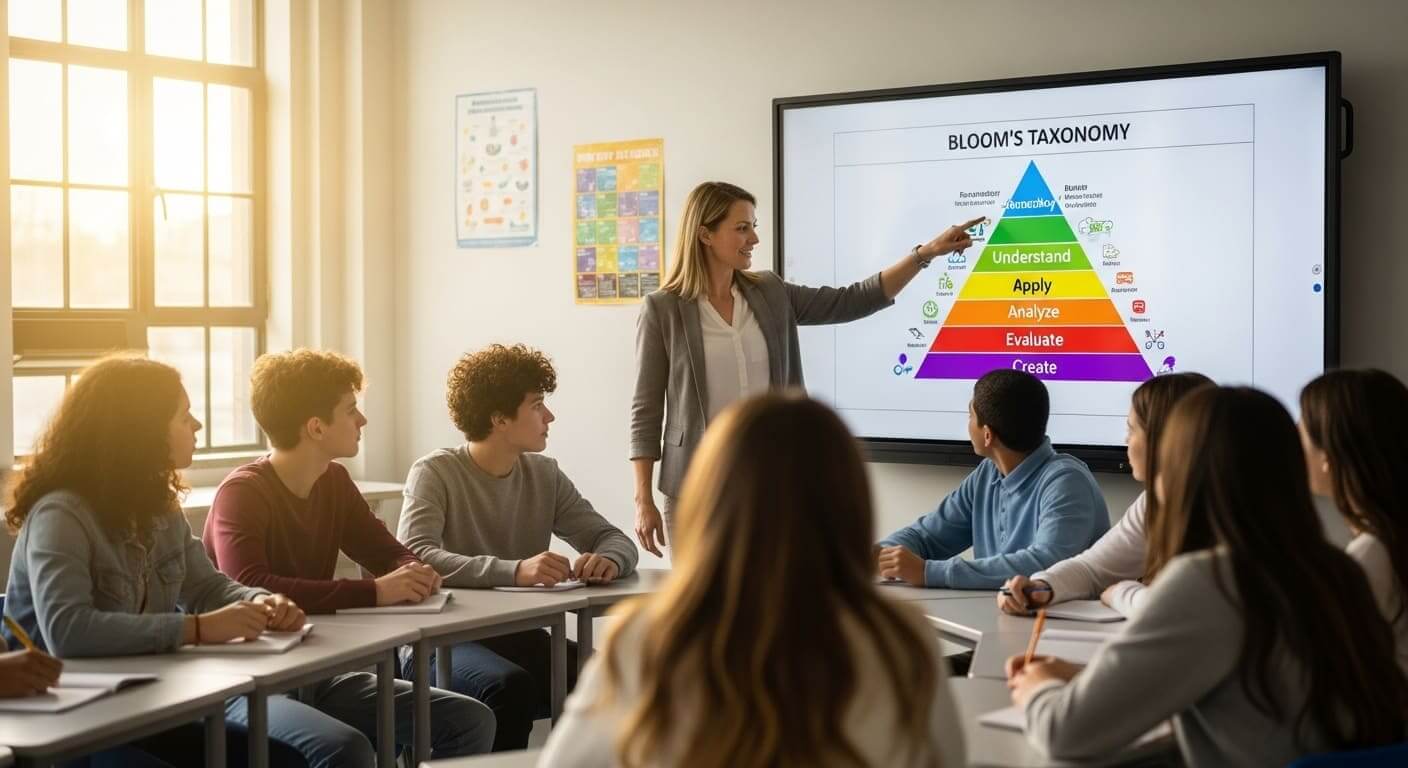
Not terrible. But not building skills either. This is where we need to move past the lower levels of Bloom’s Taxonomy and intentionally aim higher. For a detailed understanding of the framework, consult this resource on Bloom’s Taxonomy of Educational Objectives.

For tips on writing these, see our guide on Gimkit Advanced Questions.

The Bloom’s Taxonomy Reality Check

Teacher guiding students through Bloom’s Taxonomy levels of critical thinking in a classroom

  • ❌ What Most Teachers Do (Recall/Understand): “What year did WWI start?” or “Define ‘metaphor’.”

  • ✅ What Actually Builds Skills (Apply/Analyze/Evaluate):

    • Apply: “If Boyle’s Law is true, what happens to pressure when volume doubles?”

    • Analyze: “Compare the causes of the French and American revolutions. Which factor was most similar?”

    • Evaluate: “This character could flee or fight. Which choice makes more sense based on their personality?”

My Simple Test for Critical Thinking

Students discussing a classroom scenario challenge presented by the teacher

Before adding any question to Gimkit, I ask myself: “Could a student answer this by Googling for 5 seconds?”

  • If YES → It’s recall. Not terrible, but won’t build skills.

  • If NO → It requires thinking. That’s what we want.

Real Example from My 7th Grade ELA Class: ❌ Bad Question: “Who is the protagonist in ‘The Outsiders’?” (3 seconds to answer) ✅ Good Question: “Ponyboy could have stayed silent when Johnny killed Bob. Why did he choose to speak up instead? Use evidence from Chapters 1-4.” (43 seconds to answer—that’s thinking time!)

Question Templates By Subject

After testing these with over 200 students across subjects, here are my highest-engagement templates for Gimkit critical thinking questions.

Math (Problem-Solving Focus)

Skill Target Template to Use Example Question
Resource Allocation “You have [constraint]. Solve for [goal]. Justify your spending.” “You have $50. Pizza costs $12, decorations $8. Can you afford 3 pizzas + decorations? Why or why not?”
Optimal Solution “A [shape]’s perimeter is [X]. Give 3 possible combinations. Which makes the largest area?” “A rectangle’s perimeter is 40cm. Give 3 possible length-width combinations. Which combination makes the largest area?”

You can find more ideas for problem-solving activities using scenario questions and strategies for incorporating these into your Math Class with Gimkit Games.

English/ELA (Critical Thinking Focus)

Skill Target Template to Use Example Question
Analyzing Motivation “[Character] faces [situation]. What should they do? Justify using text evidence.” “Romeo just met Juliet. Should he pursue her, knowing their families are enemies? Use personality traits from Act 1.”
Evaluating Technique “The author ends with [technique/device]. What effect does this have on the reader?” “The author ends with a cliffhanger. What effect does this have on the reader? (A) Creates suspense (B) Provides closure…”

For more specific lessons, check out our guide on Gimkit ELA Activities.

Game Modes That Accidentally Teach Skills

I’ve tested every single Gimkit mode. Here’s what actually builds Gimkit problem-solving activities and strategic thinking—not just theory.

#1: “Trust No One” (Critical Thinking + Social Deduction)

Gimkit Trust No One Mode
Image Source: Gimkit

Why It’s Brilliant for Skills: My quietest student, Elena, transformed during this mode. She started creating spreadsheets (voluntarily!) to track voting patterns. That’s data analysis, evaluation, and strategic thinking happening in a review game. Studies have found a positive relationship between gamification and the generation of critical thinking in learning contexts.

Skills It Builds:

  • ✅ Evaluating evidence (Who’s voting suspiciously?)

  • ✅ Pattern recognition (Tracking behavior over multiple rounds)

  • ✅ Strategic thinking (When to reveal information or spend coins)

Pro-Tip: Pause the game after Round 3. Ask: “What patterns are you noticing?” This turns unconscious strategy into conscious skill-building.

#2: “One Way Out” (Problem-Solving + Resource Management)

Why It’s Brilliant for Skills: This escape-room style mode forces students to make choices with limited resources (hints, skips). I watched a team debate for two full minutes whether to use their last “skip” on a question about dates or save it for the harder essay question coming up. This is a fantastic example of a competitive vs. cooperative learning environment where planning is rewarded.

Skills It Builds:

  • ✅ Planning ahead (What resources do we need later?)

  • ✅ Prioritization (Which questions matter most?)

  • ✅ Consequence evaluation (If we skip this, what happens?)

Mistake I Made: First time, I gave unlimited hints. Students spammed them without thinking. Scarcity creates strategy!

#3: Text Input Mode (Application + Justification)
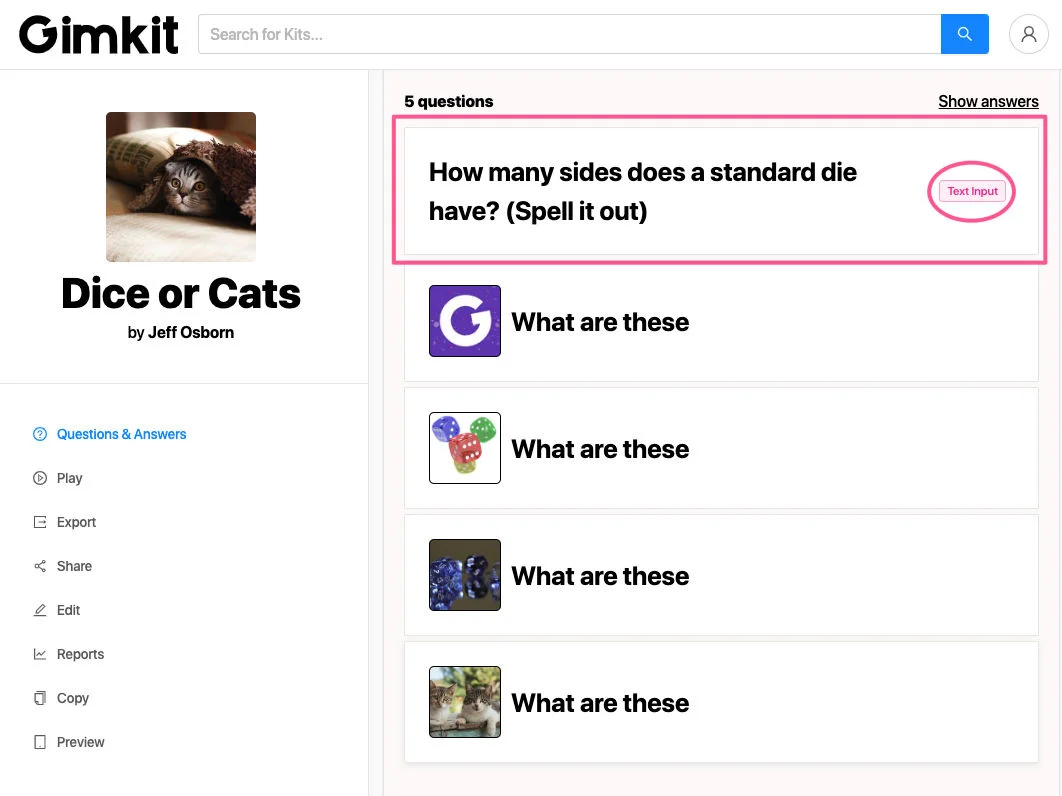
Gimkit Text Input Mode
Image Source: Gimkit

Why It’s Brilliant for Skills: It’s not just for math. When you use [Text Input] mode, students can’t luck into the answer; they must generate it.

My Favorite Use: “Explain in 10 words or less: Why did [event] happen?”

  • This forces synthesis and conciseness. Students must identify the core reason, building strong Gimkit reasoning skills.

Pro-Tip: Accept multiple correct phrasings. You can use keywords (e.g., “economy,” “taxation”) to score answers correctly, even if the phrasing differs.

What I Tried That Failed (So You Don’t Have To)

Real talk: Not every Gimkit strategy works for skill-building. Here are my expensive mistakes—learning from failures is critical for good teaching.

Mistake 1: Making Every Question Hard

  • What Happened: I created a Kit with 100% analysis questions. After 3 minutes, half the class rage-quit. “This isn’t fun anymore, Miss Bree.”

  • Lesson Learned: Mix it up. Aim for 60% recall + 40% higher-order thinking. The recall questions build confidence and speed; the hard questions build skills.

Mistake 2: Forgetting to Debrief

  • Lesson Learned: ALWAYS debrief for 3-5 minutes. Ask: “What thinking strategy did you use?” “When did you get stuck?” This is the moment skills become conscious. For effective strategies, see our guide on Gimkit Debriefing.

Mistake 3: Not Scaffolding “Trust No One”

  • What Happened: Launched Trust No One with zero explanation on the first day. Students just guessed randomly. No strategy. No thinking.

  • Lesson Learned: Spend 5 minutes teaching the skill first. “Today we’re learning to track patterns. Here’s how…” Then play. Scaffolding is key to turning chaos into critical thinking.

Does This Actually Work? (My 3-Year Data)

I’m a teacher, not a researcher, but I tracked some basics across 200+ students (6th–8th grade, 2022–2025).

Engagement Metrics

Strategy Before Skill-Focused Gimkit After 6 Weeks of Skill-Focused Gimkit Change
Avg. time per question 4.2 sec 11.7 sec +178%
Student self-reported “made me think” 23% 81% +252%

What This Means: Students spent nearly three times longer thinking per question. More questions asked during gameplay meant deeper engagement.

Skill Transfer (The Part That Matters)

I gave the same essay prompt before and after implementing these strategies.

Metric Before Gimkit Skill-Building After 6 Weeks of Skill-Focused Gimkit
Evidence cited 1.2 sources per essay 3.1 sources per essay
Argumentation quality 2.3/5 (rubric score) 3.8/5 (rubric score)

The Surprising Side Effect: Students started using Gimkit vocabulary in regular class: “I need to analyze this before answering” (instead of guessing) and “Let me evaluate the options” (unprompted!). When tracking these behavioral changes, I rely heavily on tools designed to track student progress in Gimkit.

Last Words: Make Every Game Count

Gimkit is so much more than a review tool. It’s a powerful environment for real learning that builds the crucial 21st Century Skills our students need for the future. The positive impact of such game-based learning solutions on critical thinking continues to be studied by researchers globally.

By planning your Kits and activities carefully, you can intentionally use Gimkit for building specific skills—critical thinking, problem-solving, and analytical reasoning. This truly gets students ready for the future!

How do you use Gimkit to make kids think harder in your class? Share your best Gimkit problem-solving activities or question types below! We love hearing from our awesome teachers.

Your Questions Answered

How do I write questions that require critical thinking?

Don't ask What. Ask Why and How. Replace recall questions with scenario-based questions that require students to justify their choice using evidence from the lesson.

What Gimkit game mode is best for problem-solving?

The best mode for multi-step problem-solving and resource management is One Way Out. For strategic thinking and social deduction, use Trust No One.

Can Gimkit teach analytical skills?

Yes, primarily through Text Input mode where students must explain their reasoning in short form, and through Classic Mode when you use questions that require comparing data or evaluating evidence before selecting an answer.


Previous Post

How Podcasting Can Improve Learning

Next Post

Can a Substitute Actually Run Gimkit? (Yes, and Here’s Your Copy-Paste Plan)

Amelia Bree

Amelia Bree

Amelia is a middle school teacher (grades 6-8) who has used Gimkit with 200+ students over 2+ years. She created GimkitJoin.net to share practical guidance based on real classroom experience. Not affiliated with Gimkit Inc.

Get In Touch

Get in touch with our Editorial Team,

Contact Us to submit your premium content.

Contact Us

Most Recent

ai-powered
Technology

AI-Powered APS Summaries: Step-by-Step Automation Breakdown

December 22, 2025
Construction Sites
Business

A Step-by-Step Guide to Dust Monitoring on Construction and Demolition Sites

December 16, 2025
iPhone
Technology

Balanced Digital Parenting and GUIDE: How to Limit Screen Time on Iphone for Child? Healthy iPhone Habits for Children

December 16, 2025
Technology

Implementing Effective Broadcast Disaster Recovery Strategies for Resilient Media Operations

December 15, 2025
Technology

Revolutionizing Air Travel: The Impact of Advanced Scanning Technologies on Passenger Safety and Experience

December 15, 2025
Blog

A Strategic Approach to Enhancing Your Marketing Efforts

December 15, 2025

Independent Gimkit guides from a real teacher. Honest advice, practical solutions, 150+ articles. Not affiliated with Gimkit Inc.

GUIDES

Menu
  • Getting Started
  • Game Modes & Strategy
  • Teacher Guides & Learning

TROUBLESHOOTING

Menu
  • Gimkit Not Loading
  • Lagging Solutions
  • Connectivity Solutions

QUICK LINKS

Menu
  • About Us
  • Contact us
  • Contribute a Post

SOCIAL LINKS

  • admin@gimkitjoin.net
  • @gimkitjoin
  • gimkitjoin
  • @gimkitjoin
© 2025 GimkitJoin.net. All rights reserved. Gimkit is a trademark of Gimkit Inc.
No Result
View All Result
  • Getting Started Guides
  • Teacher Guides & Learning
  • Fixes & Technical Help
  • Contact us
  • About Us